 DeepBot
Look and feel
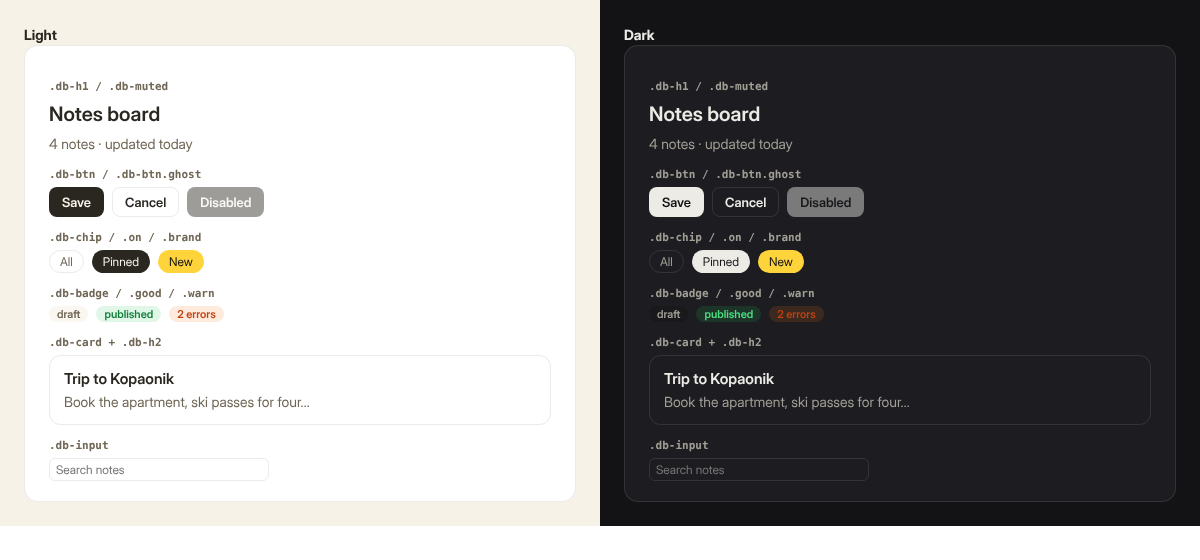
Apps should look like part of DeepBot, in light and in dark mode, without knowing DeepBot's colours. DeepBot injects a small kit into every app page and keeps its CSS variables in step with the person's theme.
#Colours and type: CSS variables
| Variable | Use |
|---|---|
--background |
DeepBot's page background |
--foreground |
text |
--card |
surfaces (cards, panels) |
--muted |
quiet fills (chips, table stripes, placeholders) |
--muted-foreground |
secondary text |
--border |
lines and outlines |
--brand |
DeepBot's yellow: one accent, sparingly |
--font |
DeepBot's text font |
--radius |
corner radius (12px) |
<html> has class dark in dark mode. Use variables for every colour you can; when you need your
own (charts, an app accent), give both themes:
:root { --accent: #4f46e5; }
:root.dark { --accent: #818cf8; }#Classes
| Class | What |
|---|---|
db-page |
a page body: padding, card background, full height |
db-card |
a surface with border and radius |
db-h1, db-h2 |
headings |
db-muted |
secondary text |
db-row |
a row with gaps that wraps |
db-col |
a column with gaps |
db-btn, db-btn ghost |
primary and secondary buttons (:disabled works) |
db-chip, db-chip on, db-chip brand |
filter chips |
db-badge, db-badge good, db-badge warn |
small labels |
db-input |
a compact input |
The kit is a floor, not a ceiling: our own apps (Deck studio, Tutor) have full design systems of their own on top of these variables. Bring your own CSS; just read colours from the variables.
#Rules
- Cards are as wide as the conversation (about 640-1000 px) and must also work at 360 px (the person may have a narrow window). Pages fill the window: design for 900-1800 px wide.
- Transparent body background in cards (the kit does this): the card sits on DeepBot's surface.
- Fonts: ship the files in the app (
ui/fonts/x.woff2,@font-facewith a relativeurl()). No Google Fonts or other CDNs: apps must work offline and pass review. - Respect
prefers-reduced-motionfor anything that moves. - Escape everything you insert into HTML. Text from files and from the Bot is data.
- Every interactive element is a real
<button>or<a>, reachable by keyboard, with a visible focus. - Empty states say what to do ("No recipes yet. Ask your Bot: 'a quick dinner with ...'").
- Errors say what happened and what to do, in one sentence, and cards call
deepbot.fail.