 DeepBot
The app's page in the catalogue
The page people see on the DeepBot site and in DeepBot (Apps -> Discover -> the app) is built from
your repository: listing.md next to app.json, and pictures in a listing/ folder. The
listing/ folder is not installed with the app.
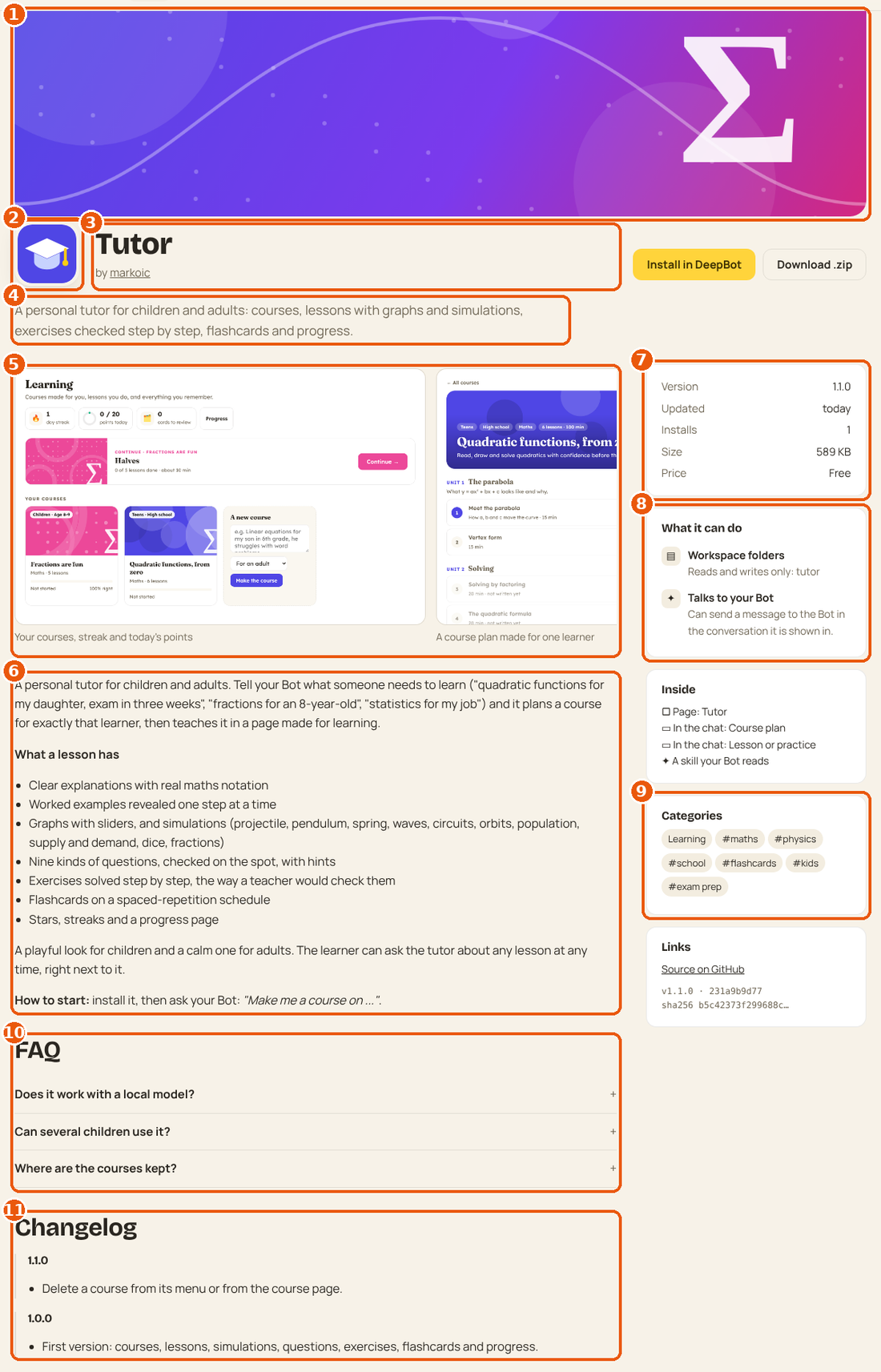
| # | Part | Comes from |
|---|---|---|
| 1 | Banner | listing/banner.png (or .jpg, .webp, .svg), about 1600x600 |
| 2 | Icon | listing/icon.svg or .png (square), else app.json icon |
| 3 | Name, author | app.json name; the author is your GitHub account |
| 4 | One-line summary | app.json summary |
| 5 | Screenshots | listing/screenshot-1.png, -2, ... (up to 12), captions from screenshots: in listing.md |
| 6 | Description | the body of listing.md (Markdown) |
| 7 | Version, updated, installs, size | the approved version and the catalogue |
| 8 | What it can do | app.json permissions, in plain words |
| 9 | Categories and tags | categories: and tags: in listing.md |
| 10 | FAQ | ## FAQ with ### Question headings |
| 11 | Changelog | ## Changelog with ### 1.2.0 headings |
#listing.md
---
categories: [productivity, life]
tags: [recipes, cooking, shopping list]
support: https://github.com/you/recipe-box/issues
homepage: https://example.com/recipe-box
video: https://www.youtube.com/watch?v=XXXXXXXXXXX
screenshots:
  - A recipe in the chat, scaled to 8 servings
  - The recipe box, by tag
  - The shopping list for the week
---

What the app does and for whom, in two or three short paragraphs. Then how to start:

**Try it:** ask your Bot *"a quick vegetarian dinner for four"*.

- What it can do, one line each
- ...

## FAQ

### Does it work without internet?
Yes, except the nutrition lookup.

## Changelog

### 1.2.0
- Shopping list page.

### 1.0.0
- First version.
Categories (up to three): productivity, office (docs, sheets, decks), design (design and
images), video-audio, learning, business, marketing (marketing and social), data (data
and research), developer (developer tools), life (life and home), games (games and fun).
Markdown: headings, lists, bold, italic, code, links and images over https. Raw HTML is shown as text.
#Screenshots that sell the app
- Real use, real-looking content (no lorem ipsum), in English unless the app is for one language.
- The first one is the money shot: the card in the chat or the main page doing its job.
- 16:10 is shown best (they are cropped to it in lists), at least 1280 px wide.
- Crop to the app (the card, or the page area); no desktop, no browser chrome.
- Show light mode first; one dark-mode shot if the app looks good in it.
How to take them: link the app in developer mode, make the content with the Bot, then capture the card or the page (any screenshot tool; with a browser automation tool, the frame's bounding box).